
Candidate details
Fetch and present candidate profile details.
The ballot response includes a lightweight version of each candidate, which is ideal for rendering ballot previews, race cards, and comparison views. However, for detailed candidate pages, you will need to use the Candidates API.
Detailed candidate information is available through:
Get candidate by ID
Returns a single candidate by id.
Find candidates
Returns paginated candidates for a supplied query.
Use these endpoints when a voter opens a candidate profile, expands a candidate card, or navigates to a dedicated candidate detail page.
When to Fetch Candidate Details
Most ballot pages do not need full candidate records on initial load.
Instead, use the slim candidate data included in race.candidates to render the ballot, then fetch full candidate details only when needed.
Common events that trigger this detailed fetch are when a voter clicks a candidate card or a voter navigates to a candidate profile page.
Recommendation
Do not fetch every full Candidate object when the ballot first loads. Use the ballot response for previews, then fetch detailed candidate records on demand.
Fetching a Candidate by ID
When a candidate appears inside a race, the response includes the candidate's ID.
Use that ID to retrieve the full Candidate object.
const response = await fetch(
  "https://www.branch.vote/api/v1/candidates/candidate_123",
  {
    headers: {
      "X-Organization-Id": "org_123",
    },
  }
);

const candidate = await response.json();
import requests
response = requests.get(
"https://www.branch.vote/api/v1/candidates/candidate_123",
headers={
"X-Organization-Id": "org_123",
},
)
candidate = response.json()curl "https://www.branch.vote/api/v1/candidates/candidate_123" \
-H "X-Organization-Id: org_123"Example Response
{
  "_id": "6a16f85b3b0c6fc25939f585",
  "name": "Josh McLaurin",
  "party": "D",
  "official": "josh-mclaurin",
  "photoPathFace": "https://branch-production-bucket.s3.amazonaws.com/images/candidates/1774465350435_blob",
  "photoPathSquare": "https://branch-production-bucket.s3.amazonaws.com/images/candidates/1774465350435_blob",
  "election": "ga-2026-primary-runoff-election",
  "qualified": "yes",
  "withdrawn": false,
  "links": [
    {
      "type": "website",
      "url": "https://www.joshforgeorgia.com"
    }
  ],
  "race": {
    "election": "ga-2026-primary-runoff-election",
    "officeName": "Lieutenant Governor",
    "party": "D",
    "longName": "Georgia Lieutenant Governor Runoff, Democratic Primary",
    "descriptionShort": "The second highest elected official in the state and President of the State Senate"
  },
  "questionnaireResponse": null,
  "readMoreLinks": [
    {
      "title": "Candidate profile",
      "url": "https://www.branch.vote"
    }
  ]
}
Cache Candidate Details
Candidate detail responses should be cached on the frontend.
This improves page speed and helps prevent unnecessary API usage. At minimum, cache candidate responses by candidate ID.
const candidateCache = new Map();

async function getCandidate(candidateId) {
  if (candidateCache.has(candidateId)) {
    return candidateCache.get(candidateId);
  }

  const response = await fetch(
    `https://www.branch.vote/api/v1/candidates/${candidateId}`,
    {
      headers: {
        "X-Organization-Id": "org_123",
      },
    }
  );

  const candidate = await response.json();
  candidateCache.set(candidateId, candidate);

  return candidate;
}useQuery({
queryKey: ["candidate", candidateId],
queryFn: async () => {
const response = await fetch(
`https://www.branch.vote/api/v1/candidates/${candidateId}`,
{
headers: {
"X-Organization-Id": "org_123",
},
}
);
return response.json();
},
staleTime: 1000 * 60 * 60,
});Avoid API Overages
Candidate profiles are often opened repeatedly as voters compare options. Caching candidate details prevents duplicate requests and helps keep usage predictable.
Display Candidate Links
Full Candidate objects are enriched with links to learn more about the candidate. These include:
- Campaign website
- Social media profiles
- Published articles about the candidates
Candidate links are often organization-specific. If your organization has added or edited candidate links in VoterGuideOS, that information is included in Candidate API responses when you make requests with your organization context.
Common link fields include:
candidate.links
candidate.specifiedLinks
candidate.readMoreLinks
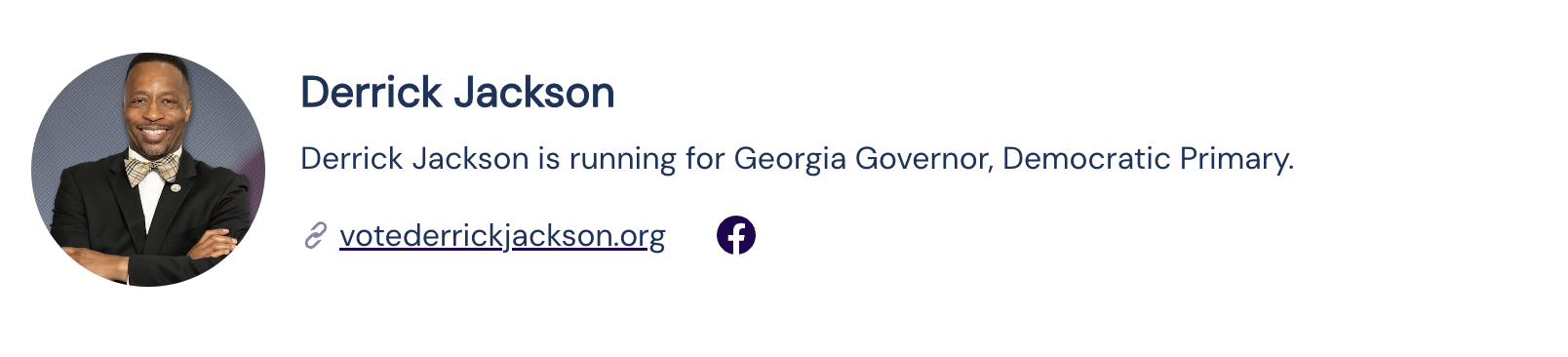
A typical UI pattern is to display candidate links as a compact list near the top of the candidate profile.
Display Questionnaire Responses
Candidate questionnaires are one of the most important reasons to fetch the full Candidate object.
Questionnaire responses are usually too detailed for the lightweight candidate preview included in the ballot response, but they are ideal for candidate profile pages and comparison views.
Questionnaire data is available through:
candidate.questionnaireResponsecandidate.questionnaireResponse is present when an organization-specific questionnaire response is available for the candidate.
Questionnaire content can be displayed on candidate profile pages or in candidate comparison views.

Handle Missing Information
Not every candidate will have every field.
Some candidates may not provide questionnaire responses. Others may not have campaign links or public contact information.
Your UI should account for missing data without making the page feel broken.