
Record user choices
Capture and persist ballot choices from your users.
In addition to displaying ballot information, the VoterGuideOS platform supports an interactive layer. Readers are able to record their candidate choices so they can reference them on Election Day.
Choices are recorded through the Choices API. They are then retrieved and accessed through the standard Ballots API.
Our Choices API handles complex edge-cases like multi-choice voting, retention elections, and ranked-choice voting.
Background: Ballot Progress
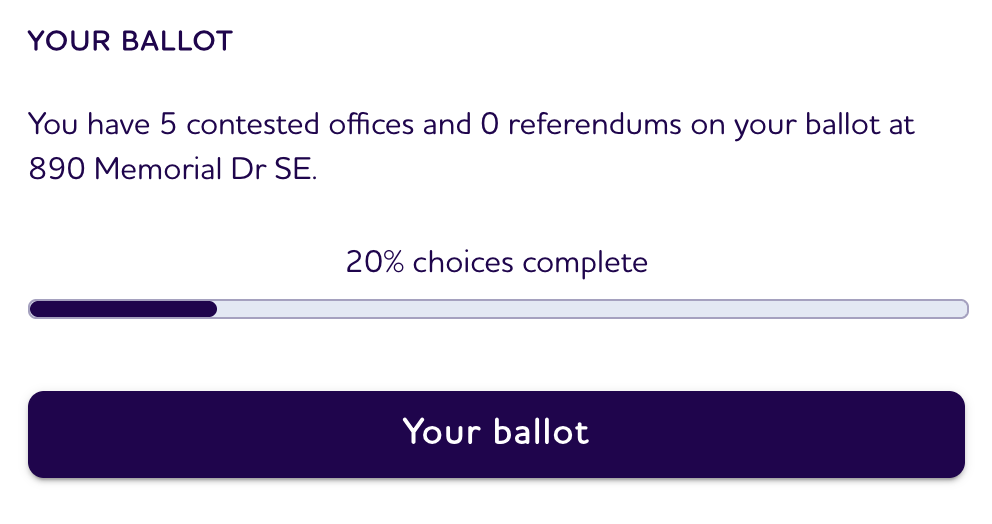
As a user makes choices, the VoterGuideOS API calculates how far they've made it through their ballot preparation. That information is available through the ballot.progress field.
type BallotProgress = {
  racesTotal: number;
  measuresTotal: number;
  racesComplete: number;
  measuresComplete: number;
  percentageComplete: number;
};
{
"progress": {
"racesTotal": 4,
"measuresTotal": 2,
"racesComplete": 1,
"measuresComplete": 0,
"percentageComplete": 16.67
}
}This progress field can be used to show a dynamic indicator of how prepared a user is for the election. It handles edge-cases like contested races.
Making your first choice
Generate UUID Lock
In order to make a choice, you'll first need to generate a UUID Lock. UUID locks help to guard sensitive voter information from being accessed from different devices.
Generate one UUID lock per local voter session and store it on the device.
const uuidLock =
  localStorage.getItem('uuidLock') ?? crypto.randomUUID();

localStorage.setItem('uuidLock', uuidLock);
Reuse this value when saving choices and when later retrieving the ballot by ID. For the underlying concept, see UUID locks.
Save a Race Choice
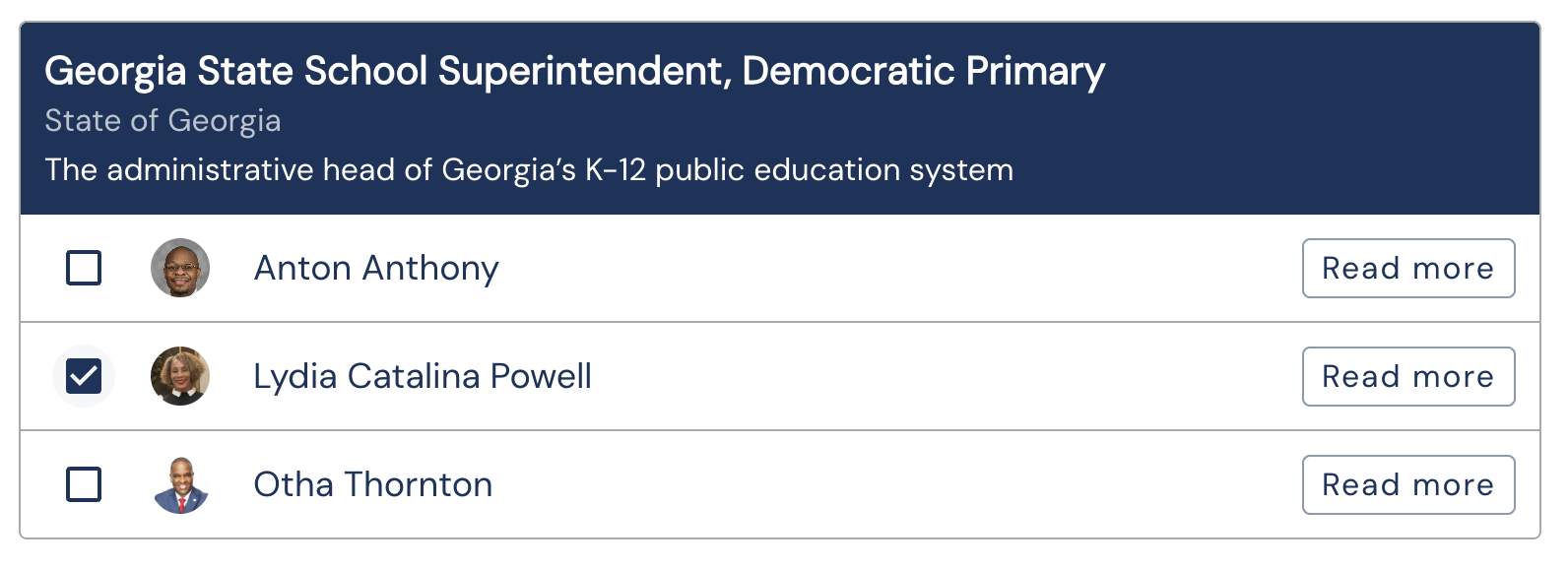
To save a candidate selection, call the Choices API with the ballot ID, race ID, candidate ID, and uuidLock.
const response = await fetch(
  "https://www.branch.vote/api/v1/choices",
  {
    method: "POST",
    headers: {
      "Content-Type": "application/json",
      "X-Organization-Id": "org_123",
    },
    body: JSON.stringify({
      ballot: ballotId,
      race: raceId,
      candidate: candidateId,
      uuidLock
    })
  }
);

const result = await response.json();
import requests
response = requests.post(
"https://www.branch.vote/api/v1/choices",
headers={
"X-Organization-Id": "org_123",
"Content-Type": "application/json",
},
json={
"ballot": ballot_id,
"race": race_id,
"candidate": candidate_id,
"uuidLock": uuid_lock,
},
)
result = response.json()curl -X POST "https://www.branch.vote/api/v1/choices" \
-H "X-Organization-Id: org_123" \
-H "Content-Type: application/json" \
-d '{
"ballot": "ballot_123",
"race": "race_123",
"candidate": "candidate_123",
"uuidLock": "local-choice-lock"
}'If a matching choice already exists for the same ballot, race, and lock, the API replaces it.
Save a Measure Choice
For ballot measures, send measure and measureChoice instead of race and candidate.
const response = await fetch(
  "https://www.branch.vote/api/v1/choices",
  {
    method: "POST",
    headers: {
      "Content-Type": "application/json",
      "X-Organization-Id": "org_123",
    },
    body: JSON.stringify({
      ballot: ballotId,
      measure: measureId,
      measureChoice: "yes",
      uuidLock
    })
  }
);

const result = await response.json();
import requests
response = requests.post(
"https://www.branch.vote/api/v1/choices",
headers={
"X-Organization-Id": "org_123",
"Content-Type": "application/json",
},
json={
"ballot": ballot_id,
"measure": measure_id,
"measureChoice": "yes",
"uuidLock": uuid_lock,
},
)
result = response.json()curl -X POST "https://www.branch.vote/api/v1/choices" \
-H "X-Organization-Id: org_123" \
-H "Content-Type: application/json" \
-d '{
"ballot": "ballot_123",
"measure": "measure_123",
"measureChoice": "yes",
"uuidLock": "local-choice-lock"
}'Use 'yes' or 'no' for measureChoice.
Choice edge-cases
Save Ranked or Multi-Choice Races
Some races allow more than one candidate selection. These are races where race.maxChoices > 1.
For multi-choice races, send candidate as an array of candidate IDs.
const response = await fetch(
  "https://www.branch.vote/api/v1/choices",
  {
    method: "POST",
    headers: {
      "Content-Type": "application/json",
      "X-Organization-Id": "org_123",
    },
    body: JSON.stringify({
      ballot: ballotId,
      race: raceId,
      candidate: [candidateId1, candidateId2],
      uuidLock
    })
  }
);

const result = await response.json();
import requests
response = requests.post(
"https://www.branch.vote/api/v1/choices",
headers={
"X-Organization-Id": "org_123",
"Content-Type": "application/json",
},
json={
"ballot": ballot_id,
"race": race_id,
"candidate": [candidate_id_1, candidate_id_2],
"uuidLock": uuid_lock,
},
)
result = response.json()curl -X POST "https://www.branch.vote/api/v1/choices" \
-H "X-Organization-Id: org_123" \
-H "Content-Type: application/json" \
-d '{
"ballot": "ballot_123",
"race": "race_123",
"candidate": ["candidate_123", "candidate_456"],
"uuidLock": "local-choice-lock"
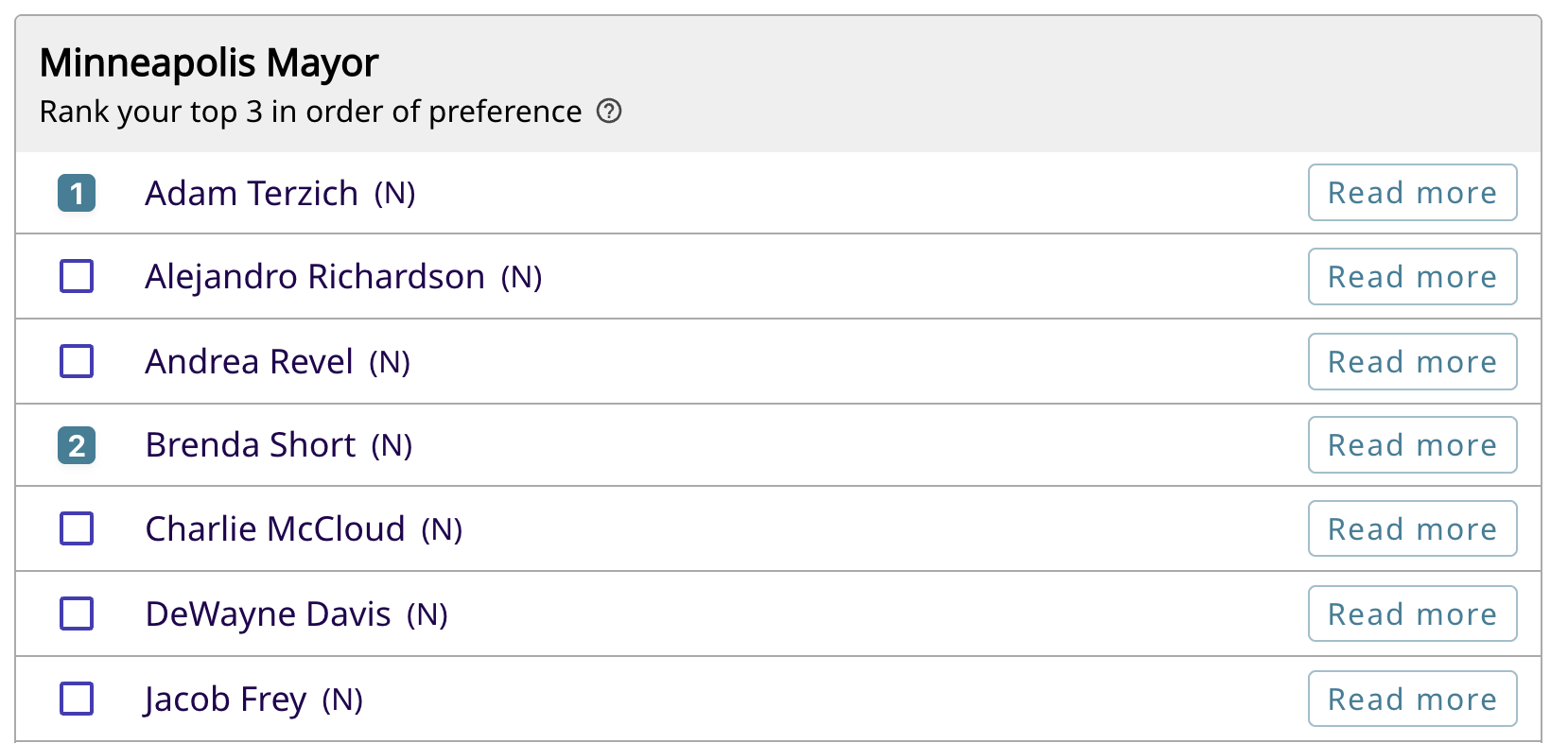
}'There are some races flagged as Ranked Choice Voting. For these races, only one candidate will be selected (so maxChoices === 1); however, the reader still can make multiple selections.
Ranked Choice details can be found in the race.rankedChoice field.
For ranked choice races, the array order of candidates represents the voter's ranking.
const response = await fetch(
  "https://www.branch.vote/api/v1/choices",
  {
    method: "POST",
    headers: {
      "Content-Type": "application/json",
      "X-Organization-Id": "org_123",
    },
    body: JSON.stringify({
      ballot: ballotId,
      race: raceId,
      candidate: [firstChoiceCandidateId, secondChoiceCandidateId],
      uuidLock
    })
  }
);

const result = await response.json();
import requests
response = requests.post(
"https://www.branch.vote/api/v1/choices",
headers={
"X-Organization-Id": "org_123",
"Content-Type": "application/json",
},
json={
"ballot": ballot_id,
"race": race_id,
"candidate": [first_choice_candidate_id, second_choice_candidate_id],
"uuidLock": uuid_lock,
},
)
result = response.json()curl -X POST "https://www.branch.vote/api/v1/choices" \
-H "X-Organization-Id: org_123" \
-H "Content-Type: application/json" \
-d '{
"ballot": "ballot_123",
"race": "race_123",
"candidate": ["first_choice_candidate_123", "second_choice_candidate_456"],
"uuidLock": "local-choice-lock"
}'The API validates the number of selections against the race configuration.
Save a Retention Vote
Retention elections require both the candidate and the voter's yes/no retention choice.
const response = await fetch(
  "https://www.branch.vote/api/v1/choices",
  {
    method: "POST",
    headers: {
      "Content-Type": "application/json",
      "X-Organization-Id": "org_123",
    },
    body: JSON.stringify({
      ballot: ballotId,
      race: raceId,
      candidate: candidateId,
      retentionChoice: "yes",
      uuidLock
    })
  }
);

const result = await response.json();
import requests
response = requests.post(
"https://www.branch.vote/api/v1/choices",
headers={
"X-Organization-Id": "org_123",
"Content-Type": "application/json",
},
json={
"ballot": ballot_id,
"race": race_id,
"candidate": candidate_id,
"retentionChoice": "yes",
"uuidLock": uuid_lock,
},
)
result = response.json()curl -X POST "https://www.branch.vote/api/v1/choices" \
-H "X-Organization-Id: org_123" \
-H "Content-Type: application/json" \
-d '{
"ballot": "ballot_123",
"race": "race_123",
"candidate": "candidate_123",
"retentionChoice": "yes",
"uuidLock": "local-choice-lock"
}'Use 'yes' or 'no' for retentionChoice.